Updated 2026 · 10 min read
Table of Contents
1-Start Here: The Fastest Way to Solve It
2-Troubleshooting Steps
3-The Confusing Part About This Problem
4-The Technical Reasons Behind It
5-If It Only Happens With One Specific Person or Company
6-A Deeper Cause Most People Don’t Know About
7-How to Test If Your Emails Are Reaching Anyone
8-Final Thoughts
9-Frequently Asked Questions
Start Here: The Fastest Way to Solve It
Before any steps do this single action: ask the recipient to examine the spam or junk folder. When the recipient checks the spam folder first this action has solved the problem often than all other solutions combined. It may feel dismissive to advise this but spam filters are designed to be strict. A normal email can be flagged for reasons unrelated to its content, such as an unfamiliar sender, a link within the message or a coincidence with that days spam patterns.
If the message is not found in spam the next quick check is to read the email address letter by letter. A single incorrect character can cause the email to be delivered successfully to an inbox. Since the delivery process reports success the sender receives no warning that the email went to a recipient.
Full Troubleshooting Steps
– Ask the recipient to check spam or junk. This single action resolves cases in less than a minute.
– Re-verify the email address, letter by letter. One typo can send the email successfully to a real inbox.
– Ask the recipient if their mailbox might be full. A full inbox can reject mail silently without any notice to either party.
– Check your own inbox for a delayed bounce-back. Delivery failure notices can arrive minutes or hours after the send not immediately.
– Look at the bounce or error code if one arrives. A code as 550 usually means the message was rejected outright while a 4xx code generally indicates a temporary issue and an automatic retry is likely underway.
– Try resending from an email address. This helps rule out your address or domain being flagged by the recipients spam filter.
– Check the domains SPF, DKIM and DMARC settings especially if a custom domain is used and the issue affects than one recipient.
– Ask the recipients IT or email admin directly if the recipient works at a company or school. Organizational spam filters can quarantine mail entirely and only an admin on that side can view or release it.
The Confusing Part About This Problem
An email that sits normally in the Sent folder while the recipient says they never received it is an email mystery. From the senders perspective everything appears correct. There is no error, no bounce notice, nothing alarming— a normal sent message that according to the account performed as expected. The confusion usually stems from an assumption: that the status “Sent” means the email was delivered. It does not. The status “Sent” only confirms that the email left the outbox and was handed off to a mail server. What occurs afterward is a mostly invisible process and many problems can arise during that interval without the sender ever realizing.
The Technical Reasons Behind It
After the basic checks are complete the usual explanations include:
– Spam or junk filtering on the recipients side, which’s by far the most common cause.
– A full inbox on the recipients end which can silently reject mail without producing a visible bounce to either party.
– Email security systems, common at companies and universities that can quarantine or silently drop external emails that trigger specific rules.
– Server‑side delivery delays, where an email remains in transit through a queue and has simply not arrived yet sometimes for hours.
– A wrong or mistyped address that happens to belong to a active mailbox so no bounce is ever generated.
If It Only Happens With One Specific Person or Company
When the problem is consistently tied to a person or organization rather than occurring randomly across various recipients the cause is usually local to that side rather, than the senders side:
– The company’s email security may have a rule that flags external senders, links or attachments matching a specific pattern.
– The personal spam filter may have learned to distrust the senders address after an earlier email was mistakenly marked as spam.
-Their mailbox may simply be full. The owner may not realize it because full mailbox bounces are not always obvious to the account owner.
In this case the most effective fix is not anything on your end. It is to let the owner know directly through another channel such as a phone call or a different messaging app so the owner can check with the owner’s IT team or clear space in the owner’s mailbox.
A Cause Most People Don’t Know About
Here is the part that most short guides skip entirely: the reputation of an email domain and its authentication setup can silently affect delivery even when nothing about the specific email looks wrong. Every domain that sends email has a reputation, built from three technical records. SPF, DKIM and DMARC. That receiving mail servers check automatically before deciding whether to deliver, flag or quietly drop a message.
SPF tells receiving servers which mail servers are allowed to send on behalf of an email domain. DKIM adds a signature that proves the email was not altered in transit. DMARC tells receiving servers what to do if SPF or DKIM checks fail. Accept the email anyway flag the email or reject the email outright.
If you are sending from a domain a business email set up without these records properly configured or even a shared hosting email account some receiving servers may silently downgrade or drop the messages without any notice reaching the owner. This is especially common when someone switches email providers or sets up a custom domain email without following the DNS setup steps recommended by the provider. If this problem keeps happening across recipients rather than just one it is genuinely worth checking before assuming anything else.
How to Test If Your Emails Are Reaching Anyone
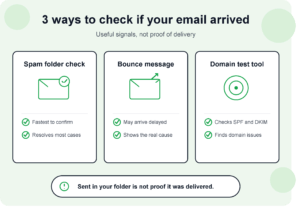
If this keeps happening. You are not sure whether the issue is isolated to one person or a broader problem with the account send a test email to a free service designed specifically to check this such as a mail-tester type tool. These tools receive the test email. Return a report showing whether the SPF, DKIM and DMARC records pass, along with a general spam score. It is a way to rule out a domain-wide authentication problem before assuming the issue is specific to one recipient’s filter.
Final Thoughts
Spam folder checks resolve this more often than any technical explanation so it is genuinely the first and fastest thing to try. If the problem keeps happening with one recipient or organization the email domain may be flagged on the recipient’s end, which is worth raising with the recipient directly.. If the problem is happening broadly across multiple different recipients it is worth stepping back and checking the email domain’s own SPF, DKIM and DMARC setup because that is the kind of quiet structural issue that explains a pattern rather than a one-off.
Frequently Asked Questions
Does ‘Sent’ in my folder guarantee the email actually left my server?
Generally yes, but it does not guarantee delivery to the recipient’s inbox. Those are two separate steps in the email process and a lot can happen between them.
Why would this happen with one recipient but not others?
This often points to spam filtering or a full inbox specific to that recipient than a problem with the account overall. However if the problem is happening across recipients the cause is more likely on the owner’s side.
Can I request a read receipt to confirm delivery?
Yes many email clients support delivery or read receipts although the recipient can typically decline to send one so it is not a fully reliable confirmation method.
What do SPF, DKIM and DMARC actually protect against?
They are mainly designed to prevent email spoofing and phishing. As a side effect having the SPF, DKIM and DMARC properly configured also improves how reliably legitimate emails get delivered rather than filtered.
Is there a way to check my domains reputation myself?
Yes. Free email testing tools exist specifically for this, where you send a test message and receive a report on the authentication setup and general spam likelihood.
Should I be worried if this happens once?
Not particularly. A single one-off case, with an explanation such, as a full inbox or a spam filter false positive is common and not usually a sign of a bigger problem. It is worth investigating only if the problem becomes a pattern.
About This Guide
I ran into this myself after I switched to a custom domain email. I noticed that a few emails were not reaching some recipients. A mail‑testing tool showed that a DKIM record was missing something a normal troubleshooting checklist would not have caught. That experience shows up in the domain‑reputation section above.
Related Fixes:
https://appfixguide.net/gmail-not-receiving-emails-how-to-fix-it/