Updated28 September ,2026 · 10 min read
Quick jump
1-Is It Really Missing, or Just Misplaced?
2-The Cause I Always Forget to Check
3-Every Reason This Happens
4-Full Fix List
5-Google’s 2024 Bulk Sender Rules Are Still Biting People in 2026
6-If You Use a Google Workspace Account, Read This Section
7-Wrapping Up
8-Third-Party Apps Can Silently Lose Access
1-Is It Really Missing, or Just Misplaced?
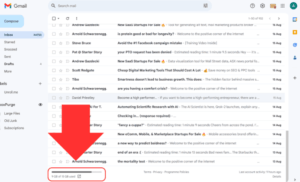
Missing emails in Gmail is almost always a filtering or storage issue rather than an actual Gmail outage, even though it can feel alarming the first time it happens. The word “missing” does a lot of work here, in the overwhelming majority of cases, the email actually did arrive, and is just sitting somewhere you’re not actively looking – Gmail’s tabs (Primary, Promotions, Social, Updates), Spam folder, and filtering rules all quietly sort mail before you ever see it land in what you think of as “the inbox”.
2-The Cause I Always Forget to Check
The filters check is the one I always forget, and the one that has caught me out the most – I had once had an old rule quietly archiving every email from a specific domain, set up years prior for a completely different reason. Filters are truly easy to forget about, and are set once, usually in order to solve a specific annoyance in the moment, and never revisited. Years later, the same rule is still running silently, and there’s no memory of you ever having created it.
Go to Settings → Filters and Blocked Addresses and scroll through the list. If you see a rule matching the sender or domain you’re missing mail from, that’s highly likely the answer, and it’s worth checking this one before anything else on this page.
3-Every Reason This Happens
Spam or Promotions/Social tab misclassification, where mail arrives but lands somewhere other than the Primary inbox
An old, forgotten filter auto-archiving, deleting, or labeling mail from a specific sender
Full Google account storage, which stops Gmail from accepting new mail altogether once the limit is reached
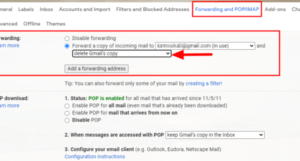
A forwarding rule silently redirecting incoming mail to a different address
Delayed sync on the mobile app, which can lag behind the actual state of your inbox
The sender being on your Blocked list, often added accidentally or inherited from an old account setup
Google’s bulk sender authentication requirements rejecting mail from senders who haven’t properly configured their own domain (explained in detail below)
4-Full Fix List
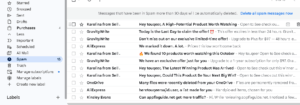
1-Check Spam and All Mail files. Misclassified emails are the single most common reason for messages that appear to be missing entirely.
2-Review your filters. Go to Settings → Filters and Blocked Addresses to check whether an old rule is auto-archiving or deleting mail from a specific sender.
3-Check your storage. Gmail stops receiving new mail entirely once your Google account storage is completely full – free up space or consider upgrading your plan.
4-Check forwarding settings. Settings → Forwarding and POP/IMAP will confirm whether mail is being silently forwarded somewhere else without you realizing.
5-Check your Promotions and Social tabs, not just Spam – legitimate mail from a business or service sender can land there instead of Primary, and it’s easy to forget these tabs exist if they’re rarely opened.
6-Ask the sender to check for a bounce-back. This confirms whether the email actually reached Google’s servers at all in the first place.
7-Force sync on mobile. Pull down to refresh the inbox, or remove and re-add your Gmail account in the app if syncing seems stuck.
8-Check your Blocked Addresses list specifically, separate from filters – Settings → Filters and Blocked Addresses has a distinct section listing blocked senders, and it’s possible to block someone accidentally from a notification without a memory of doing so.
5-Google’s 2024 Bulk Sender Rules Are Still Biting People in 2026
This is a genuinely underreported cause, and is more relevant now than it was even a year or two ago. Google introduced stricter requirements for anyone sending large volumes of email to Gmail addresses, requiring proper SPF, DKIM, and DMARC authentication, along with an easy one-click unsubscribe option for bulk senders. These rules were intended for newsletters, marketing platforms, and automated notification systems, but the practical effect is that mail from smaller businesses, newer SaaS platforms, or even a friend’s small side project using a custom domain email can get silently rejected or heavily filtered if their sending setup doesn’t meet these authentication standards.
If you’re specifically missing emails from a business, a newsletter, or a service you’ve signed up for (rather than a personal contact), and the sender confirms on their end that the email was sent successfully with no bounce, this is worth suspecting. There’s nothing you can do about it from the receiving end other than checking Spam more carefully, but it’s worth knowing so you don’t assume Gmail itself is broken when the actual cause is on the sending domain’s side.
6-If You Use a Google Workspace Account, Read This Section
If your Gmail address is a work or business account via Google Workspace (formerly G Suite), there’s an entirely separate cause worth knowing about that doesn’t apply to personal Gmail accounts: admin-level quarantine and content compliance rules. Workspace admins can set up organization-wide rules that quarantine emails matching certain criteria – attachments of specific file types, emails from newly registered domains, or messages flagged by more aggressive spam scoring than personal Gmail uses by default.
If you’re on a Workspace account and missing emails specifically from external senders (rather than colleagues within your own organization), it’s worth asking your IT administrator whether a quarantine or compliance rule might be holding the message rather than assuming it’s a personal account setting issue. This is a distinct troubleshooting path from everything else on this page, since individual users typically can’t see or release a quarantined message themselves.
7-Third-Party Apps Can Silently Lose Access
A more technical but increasingly relevant cause: if you use a third-party email client, a CRM that syncs with Gmail, or an automation tool connected to your Gmail account, Google periodically re-verifies these connections, and a permission can silently expire or get revoked – sometimes after a security review, a password change, or simply after a long period of inactivity from that app. When this happens, mail can appear to sync incorrectly or seem to “go missing” specifically within that third-party tool, even though it’s sitting completely normally in Gmail’s own web interface. Checking Google Account → Security → Third-party apps with account access and confirming the relevant app still shows as connected is worth doing if the missing-mail problem is specific to one app rather than Gmail itself.
8-Wrapping Up
If you’re missing emails from one specific sender only, the filters are almost always the answer – check those before anything else. If it’s happening across the board with no pattern, storage or a forwarding rule is far more likely, and both take under a minute to rule out. If the missing mail is specifically from a business or newsletter sender, it’s worth considering Google’s bulk sender authentication rules before assuming anything is wrong with your own account settings.
9-FAQ
Why do I receive some emails from a sender but not others?
This usually points to a filter matching specific keywords, or inconsistent sender reputation scoring, rather than a complete block on that sender.
Can a full inbox really cause missed emails?
Yes – once your Google account storage is completely full, incoming mail can bounce back to the sender rather than being delivered to you at all.
How do I confirm an email actually bounced?
Ask the sender to check for a delivery failure notification in their own inbox – that confirms definitively whether Google’s servers rejected the message.
Why would a legitimate business’s emails suddenly stop reaching me?
This can point to Google’s bulk sender authentication requirements – if the sending domain hasn’t properly configured SPF, DKIM, and DMARC, Gmail may filter or reject their mail even though nothing changed on your end.
Is there a separate cause for work Gmail accounts specifically?
Yes – Google Workspace accounts can have organization-wide quarantine or compliance rules set by an admin, which is a distinct cause from anything an individual user’s own settings can control.
Could a third-party app be the reason mail looks missing?
Yes, if the issue is specific to one connected app (a CRM, an email client, an automation tool) rather than Gmail’s own web or mobile interface – checking that app’s connection permissions in your Google Account security settings is worth doing in that case.
About This Guide
I ran into the filter version of this myself, tracing a years-old rule that had been quietly archiving a specific sender’s emails long after I’d forgotten setting it up. Checking Filters and Blocked Addresses directly rather than assuming something bigger was broken was what actually solved it.
Related Fix
https://appfixguide.net/sent-email-shows-in-sent-folder-but-recipient-never-got-it/